Guardly

Mindful breaks from social media.

Track your time, take automatic breaks, and step out of endless scrolling—without feeling locked out.
Available on the Chrome Web Store

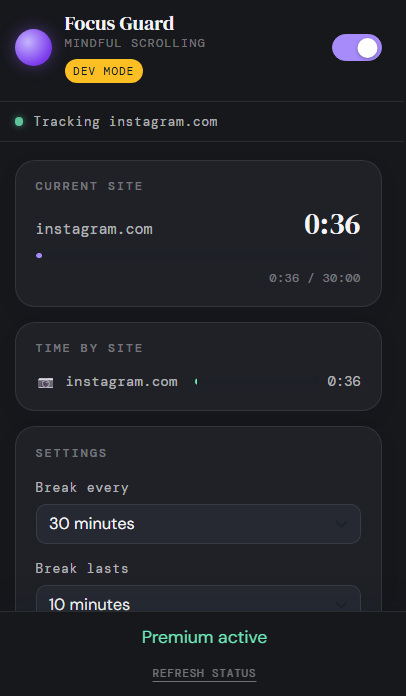
Guardly extension popup showing site tracking, timers, and break settings

Three steps to mindful scrolling

Install once. Set your limits. Guardly handles the rest in the background.

01
Add to Chrome
Install Guardly from the Chrome Web Store. No account required to start tracking and taking breaks.
02
Set your break rhythm
Choose how often breaks start after active time on a tracked site, how long they last, and which domains to watch—Instagram, Facebook, X, and custom sites.
03
Browse as usual
When the site you’re viewing hits your limit, a full-screen break overlay appears. After it ends, the timer resets and you continue—more aware, less sucked in.

What Guardly does

Built for people who want guardrails—not a hard lockout.

01
Background time tracking
Time accumulates while a tracked site is open—no need to keep the tab active or babysit a timer. It runs quietly so you can stay in flow.
02
Automatic break overlays
When a tracked site reaches your interval, a break screen covers the page with a countdown. Optional skip if you need it—your call.
03
Tracked sites & themes
Instagram, Facebook, and X are ready by default. Add custom domains. Free themes include calm mode and a cat animation; Pro unlocks more break screens.
04
Weekly usage chart
See hours per weekday on tracked social sites for this week or last—so patterns show up before habits harden.
Pro

A compact control panel

Status, current site progress, time by site, and settings—dark, minimal, ready when you need a glance.

Guardly popup: tracking status, session timer, time by site, and break settings

Breaks fire from the active tracked site’s timer. Usage stays on your device—not on our servers.

See the pattern, not just the moment

Active minutes on tracked social sites, by day—excluding time spent on break screens.

Weekly social time

Active time on tracked sites (break overlay off), by day.

  • Honest totals — bars show real social time per weekday, Monday–Sunday.
  • Compare weeks — switch This Week / Last Week to spot trends early.
  • Breaks stay separate — overlay time isn’t counted as scrolling.
  • Privacy by design — data stays local on your machine.

Pause with intention

When a break triggers, the tab gets a full-screen overlay. Free themes are included; Pro adds screens like these.

Space float · Pro
Guardly

Space float

Drift through this pause. When the timer ends, you’ll land back on track.

back in
04:32
We’re cooked · Pro
“Put the phone down. Now.”
back in 04:32

Install Guardly

Free to start. Local-first tracking. One click from the Chrome Web Store.